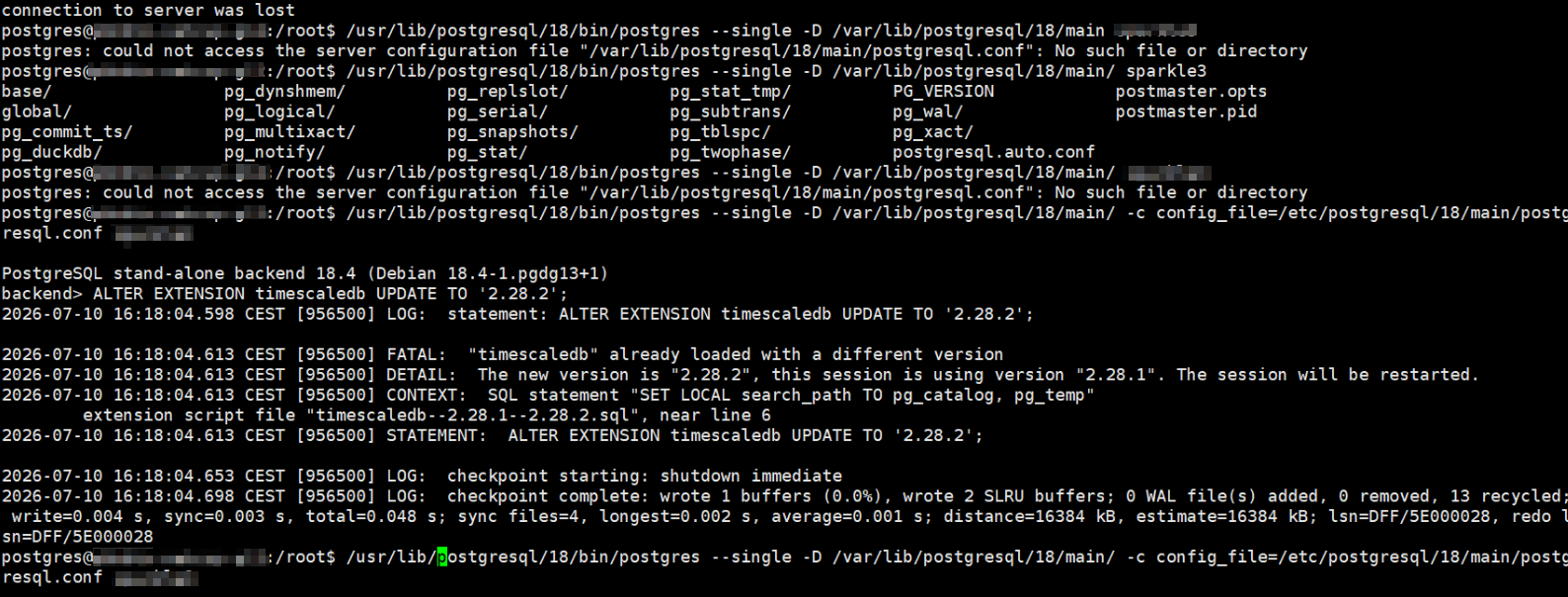
今天例行为服务器上的 PostgreSQL 及其扩展升级时,在操作 timescaledb 扩展时遇到了一个奇怪的问题:
postgres@<HOSTNAME>:/root$ psql -X -d <DBNAME> -c "ALTER EXTENSION timescaledb UPDATE TO '2.28.2';"
FATAL:  "timescaledb" already loaded with a different version
DETAIL:  The new version is "2.28.2", this session is using version "2.28.1". The session will be restarted.
CONTEXT:  SQL statement "SET LOCAL search_path TO pg_catalog, pg_temp"
extension script file "timescaledb--2.28.1--2.28.2.sql", near line 6
server closed the connection unexpectedly
This probably means the server terminated abnormally
before or while processing the request.
connection to server was lost

postgres@<HOSTNAME>:/root$
扔进 AI 里一顿分析,让我在单用户模式下,阻止所有连接数据库尝试后再升级,但很遗憾失败了。而且不能从 preload_libraries 里删掉,timescaledb 会很不开心:
postgres@<HOSTNAME>:/root$ /usr/lib/postgresql/18/bin/postgres --single -D /var/lib/postgresql/18/main/ -c config_file=/etc/postgresql/18/main/postgresql.conf <DBNAME>

PostgreSQL stand-alone backend 18.4 (Debian 18.4-1.pgdg13+1)
backend> ALTER EXTENSION timescaledb UPDATE;
2026-07-10 16:25:55.668 CEST [966445] LOG:  statement: ALTER EXTENSION timescaledb UPDATE;

2026-07-10 16:25:55.702 CEST [966445] FATAL:  extension "timescaledb" must be preloaded
2026-07-10 16:25:55.702 CEST [966445] HINT:  Please preload the timescaledb library via shared_preload_libraries.

	This can be done by editing the config file at: /etc/postgresql/18/main/postgresql.conf
	and adding 'timescaledb' to the list in the shared_preload_libraries config.
		# Modify postgresql.conf:
		shared_preload_libraries = 'timescaledb'

	Another way to do this, if not preloading other libraries, is with the command:
		echo "shared_preload_libraries = 'timescaledb'" >> /etc/postgresql/18/main/postgresql.conf

	(Will require a database restart.)


2026-07-10 16:25:55.702 CEST [966445] CONTEXT:  SQL statement "CREATE FUNCTION _timescaledb_functions._tmp_restart_background_workers() RETURNS BOOL
	    AS '$libdir/timescaledb', 'ts_bgw_db_workers_restart' LANGUAGE C VOLATILE"
	PL/pgSQL function inline_code_block line 4 at SQL statement
	SQL statement "DO $$
	BEGIN
	  IF EXISTS (SELECT FROM pg_namespace WHERE nspname='_timescaledb_functions') THEN
	    CREATE FUNCTION _timescaledb_functions._tmp_restart_background_workers() RETURNS BOOL
	    AS '$libdir/timescaledb', 'ts_bgw_db_workers_restart' LANGUAGE C VOLATILE;
	    PERFORM _timescaledb_functions._tmp_restart_background_workers();
	    DROP FUNCTION _timescaledb_functions._tmp_restart_background_workers();
	  ELSE
	    -- timescaledb < 2.11 does not have _timescaledb_functions schema
	    CREATE FUNCTION _timescaledb_internal._tmp_restart_background_workers() RETURNS BOOL
	    AS '$libdir/timescaledb', 'ts_bgw_db_workers_restart' LANGUAGE C VOLATILE;
	    PERFORM _timescaledb_internal._tmp_restart_background_workers();
	    DROP FUNCTION _timescaledb_internal._tmp_restart_background_workers();
	  END IF;
	END
	$$"
	extension script file "timescaledb--2.28.1--2.28.2.sql", near line 50
2026-07-10 16:25:55.702 CEST [966445] STATEMENT:  ALTER EXTENSION timescaledb UPDATE;

2026-07-10 16:25:55.743 CEST [966445] LOG:  checkpoint starting: shutdown immediate
2026-07-10 16:25:55.759 CEST [966445] LOG:  checkpoint complete: wrote 12 buffers (0.0%), wrote 2 SLRU buffers; 0 WAL file(s) added, 0 removed, 0 recycled; write=0.005 s, sync=0.003 s, total=0.019 s; sync files=13, longest=0.002 s, average=0.001 s; distance=16384 kB, estimate=16384 kB; lsn=DFF/60000028, redo lsn=DFF/60000028
很奇怪啊,按理说单用户模式已经没有预先加载的可能了,为什么呢。
在沉思中途,想起了最初安装 timescaledb 和 pg_duckdb 扩展时就存在冲突,两个扩展共用同一个函数名导致其中一个无法安装到库的问题:
https://github.com/duckdb/pg_duckdb/issues/934
当时的解决方案是先安装其中一个,再安装另外一个(有先后次序之分)。
解决方案
解决起来其实也很简单——
先将 pg_duckdb 从 shared_preload_libraries 里删除掉,启动 postgresql,再运行 ALTER EXTENSION timescaledb UPDATE;。
postgres@<HOSTNAME>:/root$ /usr/lib/postgresql/18/bin/postgres --single -D /var/lib/postgresql/18/main/ -c config_file=/etc/postgresql/18/main/postgresql.conf <DBNAME>

PostgreSQL stand-alone backend 18.4 (Debian 18.4-1.pgdg13+1)
backend> ALTER EXTENSION timescaledb UPDATE;
2026-07-10 16:28:02.548 CEST [969581] LOG:  statement: ALTER EXTENSION timescaledb UPDATE;
没错,就是这么简单,一切都是 pg_duckdb 搞的鬼。